


Comparison between Pandora and Apple Music
In the vast landscape of music streaming platforms, Pandora and Apple Music stand out as popular choices for enthusiasts seeking an immersive and personalized musical experience. This article aims to guide readers through a comparison between Pandora and Apple Music.
Whether you're an avid listener or a curious newcomer, understanding the similarities and differences between Pandora and Apple Music can help you make an informed decision about which service aligns best with your preferences.
By exploring various aspects such as music libraries, user interfaces, personalized recommendations, and pricing models, this article aims to equip readers with the necessary knowledge to choose the ideal streaming platform that caters to their musical cravings.
Contents Guide Part 1. Overview of Pandora and Apple MusicPart 2. Comparison between Pandora vs. Apple MusicPart 3. Bonus: How to Enjoy Free Pandora MusicPart 4. Conclusion:
Part 1. Overview of Pandora and Apple Music
Pandora Music is a popular music streaming platform that offers a unique listening experience based on personalized radio stations. Launched in 2000, Pandora initially gained fame for its innovative Music Genome Project, which analyzes songs based on various musical attributes such as melody, rhythm, instrumentation, and lyrics.
This project allows Pandora to create customized radio stations for users based on their preferred artists, genres, or songs. Users can provide feedback by giving thumbs up or thumbs down to tracks, enabling Pandora to refine their recommendations and tailor the music selection further. Pandora also offers on-demand streaming options, allowing users to search for specific songs and albums.
On the other hand, Apple Music is a comprehensive music streaming service developed by Apple Inc. It was launched in 2015 as a competitor to established platforms like Spotify and Pandora. Apple Music boasts a vast catalog of over 75 million songs, covering a wide range of genres and languages. It combines on-demand streaming with personalized recommendations, curated playlists, and radio stations.
Apple Music includes exclusive content and collaborations with renowned artists, offering subscribers access to unique releases and live performances. The platform also features Beats 1 Radio, a global live radio station helmed by popular DJs and artists, delivering a curated mix of music, interviews, and special programming.
Part 2. Comparison between Pandora vs. Apple Music
Pandora and Apple Music are two prominent music streaming platforms that offer diverse features and cater to the needs of music enthusiasts. Let's compare them across various aspects:
Costs:
- Pandora: Offers a free ad-supported version, Pandora Plus ($4.99/month) with ad-free listening and unlimited skips, and Pandora Premium ($9.99/month) with on-demand streaming.
- Apple Music: Offers a free trial, followed by individual plans ($9.99/month), family plans ($14.99/month for up to six people), and student plans ($4.99/month).
Music Libraries:
- Pandora: Utilizes the Music Genome Project to create personalized radio stations. Its library includes over 70 million tracks, with a focus on personalized recommendations and curated playlists.
- Apple Music: Boasts a massive library of over 75 million songs, covering various genres and languages. It also offers exclusive releases, collaborations, and live performances from renowned artists.
Compatibility and Integration:
- Pandora is compatible with various devices and platforms, including mobile devices, desktops, smart speakers, and car systems. It also integrates with voice assistants like Amazon Alexa and Google Assistant.
- Apple Music is well-integrated with Apple's ecosystem, including iPhones, iPads, Macs, Apple Watch, and HomePod. It also has apps for Android, and Windows, and can be accessed via web browsers.
Audio Quality:
When it comes to audio quality, Pandora and Apple Music have their offerings.
- Pandora: Pandora offers a standard audio quality of up to 192 kbps for free users, ensuring a satisfactory listening experience. However, for those who subscribe to Pandora Premium, the audio quality is upgraded to 320 kbps, providing an enhanced sound reproduction.
- Apple Music: Apple Music excels in delivering high-quality audio. It provides a streaming experience with the AAC (Advanced Audio Coding) format at a default bit rate of 256 kbps. This ensures a superior sound quality with clear vocals and detailed instrumentals. In addition to the default audio quality, Apple Music takes it a step further by offering support for lossless audio and high-resolution audio through its Spatial Audio feature. Lossless audio provides a bit-perfect reproduction of the original studio recording, preserving every detail and nuance.
Subscriptions:
- Pandora: When it comes to subscription options, Pandora presents users with a range of choices to suit their preferences. They offer a selection that includes a free version supported by ads, an ad-supported plan that allows users to enjoy their music uninterrupted, and a premium plan that comes with additional features.
- Apple Music: Apple Music caters to a wider audience by providing a variety of plans tailored to different user needs. They offer individual plans for those seeking a personal music experience, family plans that allow multiple family members to access the service, and even student plans with special pricing tiers. These plans ensure that users have the flexibility to choose the subscription option that best fits their requirements and grants them access to the full range of features and benefits offered by Apple Music.
User Interface:
- Pandora: Pandora places a strong emphasis on providing users with a simple and user-friendly experience through its minimalist interface. The platform aims to streamline the process of discovering music by focusing on personalized radio stations and carefully curated playlists. By prioritizing these features, Pandora allows users to effortlessly explore new music tailored to their tastes. The interface is designed to be intuitive and uncomplicated, making it easy for users to navigate and enjoy their favorite tracks.
- Apple Music: In contrast, Apple Music takes pride in its visually appealing interface that captivates users from the moment they launch the app. The platform's design incorporates visually pleasing elements and intuitive navigation, ensuring that users can effortlessly find what they're looking for. Apple Music goes beyond personalized radio stations and curated playlists, offering a diverse range of features such as personalized recommendations and on-demand streaming options.
Additional Features:
- Pandora: Features the Music Genome Project for personalized radio, personalized playlists, offline listening for premium subscribers, and integration with select car systems.
- Apple Music: Offers exclusive content, live radio (Beats 1), artist exclusives, music videos, lyrics integration, and seamless integration with other Apple services.
By considering factors such as costs, music libraries, compatibility, audio quality, subscriptions, user interface, and additional features, users can make an informed decision about which music streaming platform aligns better with their preferences and requirements.
Part 3. Bonus: How to Enjoy Free Pandora Music
After reviewing the previous sections that make the comparison between Pandora and Apple Music, you should now have a better understanding of the differences between the two services. It's important to know that with Pandora Music, you can save your favorites on any device or media player you use, thanks to applications like DumpMedia Pandora Music Converter.
This tool allows you to download and convert music, audiobooks, and other content from Pandora Music. It is compatible with both Windows and macOS, making it cross-platform compatible while adhering to copyright regulations in the United States.
If you're not willing to spend a significant amount of money on streaming or purchasing music downloads, DumpMedia Pandora Music Converter is an excellent option to explore. It provides a convenient way to listen to your favorite music by obtaining tangible downloads of your preferred tracks from Pandora and adding them to your collection. To use the tool, follow these steps:
- Click the above button and download the Pandora Music Converter setup file from the official site, based on your computer's operating system.
- Run the downloaded setup program and install the software on your computer by following the provided instructions.
- Add the music you want to download from Pandora Music by using the drag-and-drop feature in the DumpMedia interface.
- Select the MP3 format as the desired output, considering its compatibility with various electronic devices. Choose a destination folder on your hard drive to store the converted files.
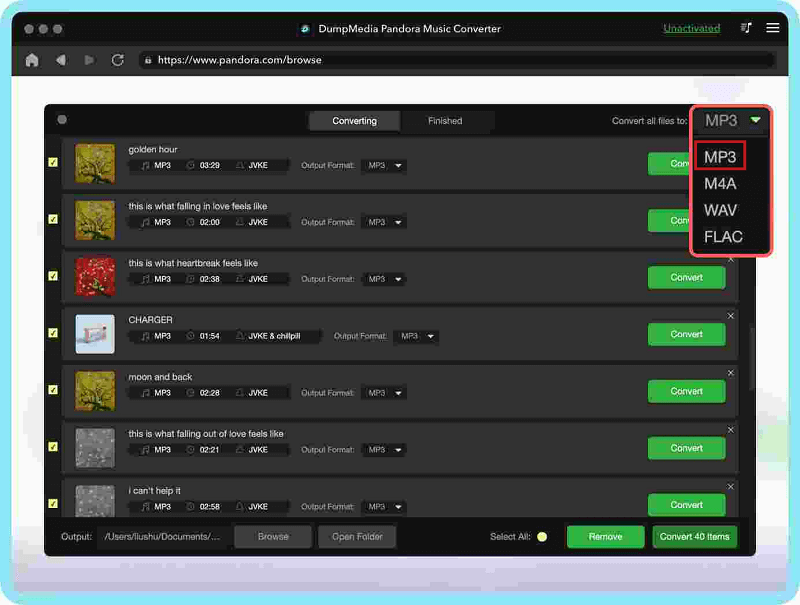
- Click the "Convert" button and wait for the conversion process to complete. Once finished, the files will be available in the specified destination folder.
By utilizing the DumpMedia Pandora Music Converter, you can enhance your music listening experience and have greater control over your favorite tracks from Pandora.
Part 4. Conclusion:
In conclusion, the comparison between Pandora and Apple Music has shed light on the unique features and strengths of each platform. As a listener, it's essential to carefully consider your preferences and requirements before making a decision.
By using this guide as a reference, you can weigh the factors of costs, music libraries, compatibility, audio quality, subscriptions, user interface, and additional features.
Furthermore, if you are an existing Pandora user who wishes to enjoy your favorite Pandora tracks on other devices or platforms, consider utilizing the DumpMedia Pandora Music Converter. This powerful tool allows you to convert Pandora music to popular audio formats, thereby enabling you to enjoy your Pandora playlist offline, on any device.
The DumpMedia Pandora Music Converter ensures that you have the freedom and flexibility to access your favorite tunes anytime, anywhere.
Ultimately, the choice between Pandora and Apple Music rests on your personal preferences and requirements. Make an informed decision and let your musical journey flourish with the streaming platform that resonates best with your tastes.